The Professional GPU Server Case Supplier-Onechassis

About Us

Why Cooling Design Defines a Good GPU Server Case?

Views : 1591
Update time : 2025-09-10 14:09:00

When you choose a GPU server case, apparently you’re not just picking a metal box. You’re making a decision that affects performance, uptime, and even your electricity bill. Cooling design often makes or breaks that decision. In data-heavy environments—whether it’s a data center, AI lab, or rendering studio—the wrong airflow can turn a powerful GPU into a bottleneck. 


The Heat Problem in GPU Servers

GPUs run hot—sometimes hitting temperatures above 80°C when under full load. Now imagine stacking several GPUs inside a server rack. Without a proper cooling design, you’ll face:

Thermal throttling: GPUs slow down to prevent overheating. 
Component stress: High heat reduces the lifespan of boards, fans, and power units. 
Energy waste: Fans spin harder, pulling more power but not always solving the problem. 

Cooling isn’t just about comfort; it’s about reliability and ROI.


Airflow Defines Performance

In GPU server chassis design, airflow is king. A well-planned case creates a “cold aisle in, hot aisle out” system that matches data center cooling strategies. Poor airflow means hot spots, uneven cooling, and unpredictable failures.

Key Elements of Airflow Design

1.  Front-to-Back Cooling  – Fresh air enters from the front and leaves at the rear. 
2.  Isolated GPU Chambers  – Separating GPUs and CPUs prevents thermal crossover. 
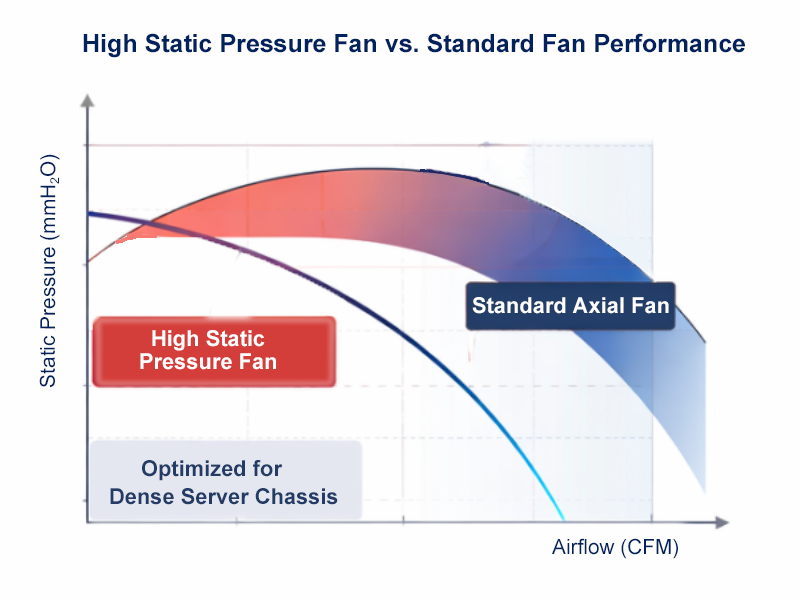
3.  High-Static-Pressure Fans  – Push air effectively through dense heatsinks.  

  • AI Training Centers: Multi-GPU clusters need stable performance over weeks. Poor airflow can cut training speed by 20–30%. 
  • Data Centers: Rack density is everything. A well-cooled 4U chassis can pack 8 GPUs without thermal throttling. 
  • Research Labs: Long simulations often crash when GPU temps rise. A properly ventilated case prevents wasted compute time.  

A simplified comparison showing how cooling design affects throughput (Data: Cooling vs. Performance):

| GPU Server Case Type               | Max GPU Count | Avg Temp Under Load | Performance Stability | Typical Use       |

| Poorly Designed 4U                     |       4 GPUs        |           85–90°C             |     70% (throttling)      | Entry setups      |
| Standard 4U                                 |       6 GPUs        |           75–80°C             |     85%                       | Small clusters    |
| Optimized 4U (OCG4660 Series) |       8 GPUs        |           68–72°C             |     95%+                     | AI training, HPC |


For Buyer's Checklist

When evaluating GPU server cases, ask these questions blow. If the answer to most is “yes,” you’re on the right track.

- Does the airflow move front-to-back with no blockages? 
- Are GPU chambers separated from CPU and PSU heat? 
- How many fans are included, and what’s their CFM rating? 
- Can the case support future cooling upgrades like liquid loops? 
        Hidden Costs of Bad Cooling

        Cutting costs on cooling can backfire:
        - More RMA claims when GPUs fail early. 
        - Inconsistent workloads, especially in HPC and AI inference. 
        - Higher OPEX, since fans consume more power to chase temps. 

        Choosing the right chassis upfront is cheaper than retrofitting later.


        OneChassis: Built for Cooling Efficiency

        We design GPU server cases with cooling at the core. Airflow isn’t an afterthought—it’s engineered from day one. 

        - Custom OEM/ODM options: Fan placement, ducting, and radiator integration. 
        - High-density support: Up to 8–10 GPUs with balanced airflow. 
        - Tested in real workloads: AI training, video rendering, and HPC environments. 

        We don’t just sell cases—we deliver chassis that keep your GPUs working at full potential.


        A superior GPU Server Case is specifically engineered to combat these challenges, acting as the first line of defense against the relentless thermal assault.


        Beyond Airflow: The Art and Science of GPU Server Case Cooling

        Effective cooling in a GPU Server Case is far more sophisticated than simply blowing air around. It's a holistic design philosophy encompassing several critical elements:

        Optimized Airflow Pathways: The fundamental principle is to create a clear, unobstructed path for cool air to enter, pass efficiently over heat-generating components (especially GPUs), and then be expelled. This involves:

        • Strategic Fan Placement: High-quality server cases feature multiple fans (intake and exhaust) strategically positioned to create positive or negative pressure within the chassis, ensuring consistent airflow.
        • Component Layout: The internal layout is designed to minimize air turbulence and direct airflow precisely where it's needed most, preventing hot spots.
        • GPU Spacing: Sufficient spacing between GPUs is crucial to prevent them from "choking" each other with hot exhaust, allowing each card to breathe and dissipate heat effectively.

        Advanced Cooling Technologies: Modern GPU server cases often incorporate advanced features to further enhance thermal management:

        • Direct-to-GPU Cooling: Some designs utilize dedicated air shrouds or channels that direct cool air directly to the GPU heatsinks, maximizing heat exchange efficiency.
        • Liquid Cooling Compatibility: For the most demanding applications and highest-density GPU configurations, some premium GPU Server Cases are designed with integrated liquid cooling loops or provide ample space and mounting points for third-party liquid cooling solutions. Liquid cooling, with its superior thermal conductivity, can dramatically lower GPU temperatures.
        • Hot-Swappable Fan Modules: Redundant, hot-swappable fan modules are a hallmark of enterprise-grade server cases. This allows for fan replacement without powering down the server, ensuring continuous operation and easier maintenance.

        Material and Construction: The very materials used in the server case play a role. High-quality steel or aluminum, combined with robust construction, helps maintain structural integrity and can also aid in passive heat dissipation. Anti-vibration measures also prevent components from loosening due to fan-induced vibrations, which can further impede cooling efficiency.


        相关新闻
        How We Design Thermal Paths: Airflow, Static Pressure & Fan Zones How We Design Thermal Paths: Airflow, Static Pressure & Fan Zones

        Dec 25,2025
        In high-density GPU and AI servers, cooling isn’t an accessory — it’s infrastructure. At OneChassis, thermal design starts at the chassis level. We engineer clear front-to-rear airflow paths to align with data-center cold-aisle / hot-aisle layouts, reducing recirculation and heat buildup under sustained load.
        How a Finance Team Addresses GPU Thermal Constraints --(One of our client cases) How a Finance Team Addresses GPU Thermal Constraints --(One of our client cases)
        Dec 15,2025
        Need more stability in your rack? If your GPUs throttle under load, the issue may not be your hardware—but how it’s housed.
        GPU Server Chassis: The Backbone Behind Real Compute Power GPU Server Chassis: The Backbone Behind Real Compute Power
        Dec 02,2025
        PU server chassis serve as the structural and thermal backbone of modern AI computing. They enable stable GPU performance through optimized airflow, high-density layouts, and enterprise-grade mechanical design. A well-engineered chassis doesn’t just hold components—it ensures sustained compute power, scalability, and long-term reliability in data centers, AI labs, and edge environments. OneChassis provides OEM/ODM-ready GPU server enclosures from 4U to 10U, helping enterprises build systems that deliver consistent performance under real workloads.
        Inevitable Liquid-Cooled System Inevitable Liquid-Cooled System
        Nov 25,2025
        Liquid-cooled industrial chassis deliver reliable thermal performance for high-density computing in factories, edge data centers, and AI-driven automation. By using coolant instead of high-RPM fans, these systems achieve lower noise, higher heat-removal efficiency, and stable operation under continuous heavy workloads. Liquid cooling supports GPU-intensive industrial AI workloads, enhances system longevity, and enables deployment in thermally constrained or dusty environments where air cooling struggles.