How We Design Thermal Paths: Airflow, Static Pressure & Fan Zones
In high-density GPU and AI servers, cooling isn’t an accessory — it’s infrastructure.
At OneChassis, thermal design starts at the chassis level. We engineer clear front-to-rear airflow paths to align with data-center cold-aisle / hot-aisle layouts, reducing recirculation and heat buildup under sustained load.
We focus on three core pillars in thermal path engineering:
1. Optimized Airflow Pathways
The first rule of effective cooling is clear, unobstructed airflow: cold air must enter the chassis, pass over heat-generating components, and exit without mixing with its own exhaust. For rack systems, this almost always means a strict front-to-rear airflow design, mimicking the data center’s cold-aisle/hot-aisle strategy. Onechassis
We minimize turbulence and resistance by:
-
Structuring internal layouts that separate airflow zones (e.g., GPUs, CPUs, power supplies).
-
Avoiding obstacles like tangled cables or poorly placed drive cages that can create hotspots.
-
Using perforated panels and strategically placed vents to maximize intake and exhaust effectiveness.
This disciplined airflow path ensures that each component receives cool air proportional to its heat output — eliminating thermal bottlenecks even in fully populated GPU systems.
2. Static Pressure & High-Performance Fans
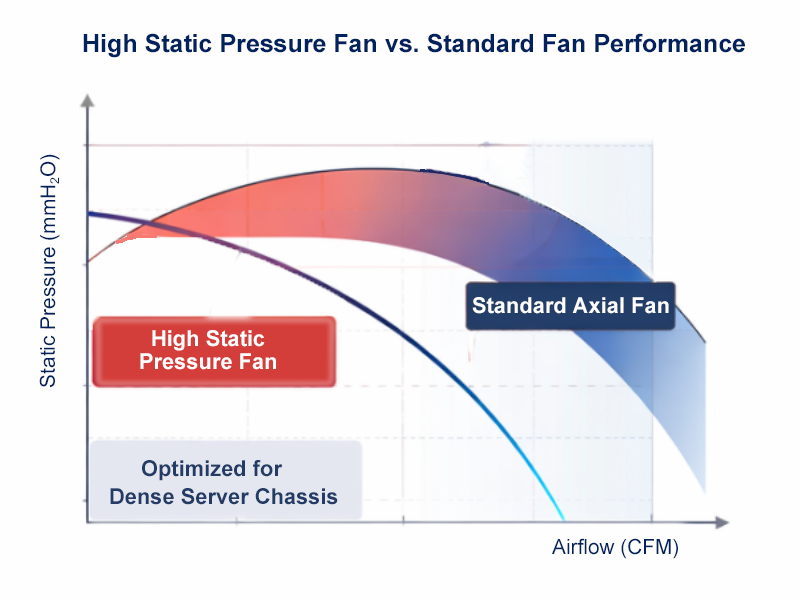
Airflow volume (CFM) alone does not guarantee cooling performance. A fan must generate static pressure high enough to push air through heatsinks, filters, ducting, and other impediments within the chassis.
High–static–pressure fans are chosen not simply for raw airflow numbers but for how effectively they maintain consistent flow against system resistance. These fans drive air through dense fin stacks and narrow path geometries — which is exactly what high-density GPU servers demand.
Additionally, we configure fans into fan zones or “fan walls.” These are arrays of fans placed across different sections of the chassis to balance pressure and control airflow independently for GPUs, CPUs, and other critical areas. This segmented approach:
Prevents one region from starving another of airflow
Enables redundant cooling paths (e.g., N+1 fan design)
Simplifies serviceability via modular, hot-swappable fan trays
3. Fan Zones & Zoned Cooling Strategies
Rather than treating a chassis as a monolithic space, we design multiple cooling zones — each tailored to a component group’s thermal characteristics. GPUs, with their concentrated power draw and heat output, form a primary zone; CPUs and memory form another; power supplies and I/O modules yet another.
Zoned designs allow differential airflow tuning:
-
GPU zone fans can be optimized for maximum pressure to sweep cool air over large fin stacks.
-
CPU zone fans manage slightly warmer air downstream.
-
PSU zone cooling ensures power electronics remain within tolerance without disrupting upstream cooling. Medium
This approach mitigates the classic problem of “heat shadowing” where hot exhaust from a component is inadvertently fed back into adjacent parts. By controlling airflow zones, we maintain consistent temperatures across the entire system.
Designing thermal paths with precision: optimizing airflow, selecting high-static-pressure fans, and implementing fan zones that collectively deliver superior cooling under demanding workloads. Comes with the natural result is lower thermal throttling risk, more predictable performance, and longer component lifespan — even in fully populated GPU servers.
 When AI Becomes A Threat, Infrastructure Becomes the Front Line
 Storage Density Choices in the Same Server Chassis
 Welcoming 2026: Building the Next Year of AI Infrastructure Together
 How We Design Thermal Paths: Airflow, Static Pressure & Fan Zones